Reader

#programming posts

from Software and Tech

I recently caused myself a bit of a minor issue by installing some updates on the Keyboard Vagabond cluster. It wasn't a big deal, just some version number updates from a project called renovate that automatically creates pull requests when package versions that you use get updated. Doing this did trigger a restart on the redis cluster, which means that different services may need to be restarted because their redis connection strings get stale. I had restarted the piefed-worker pod, but the update didn't seem to stick and I didn't realize it.

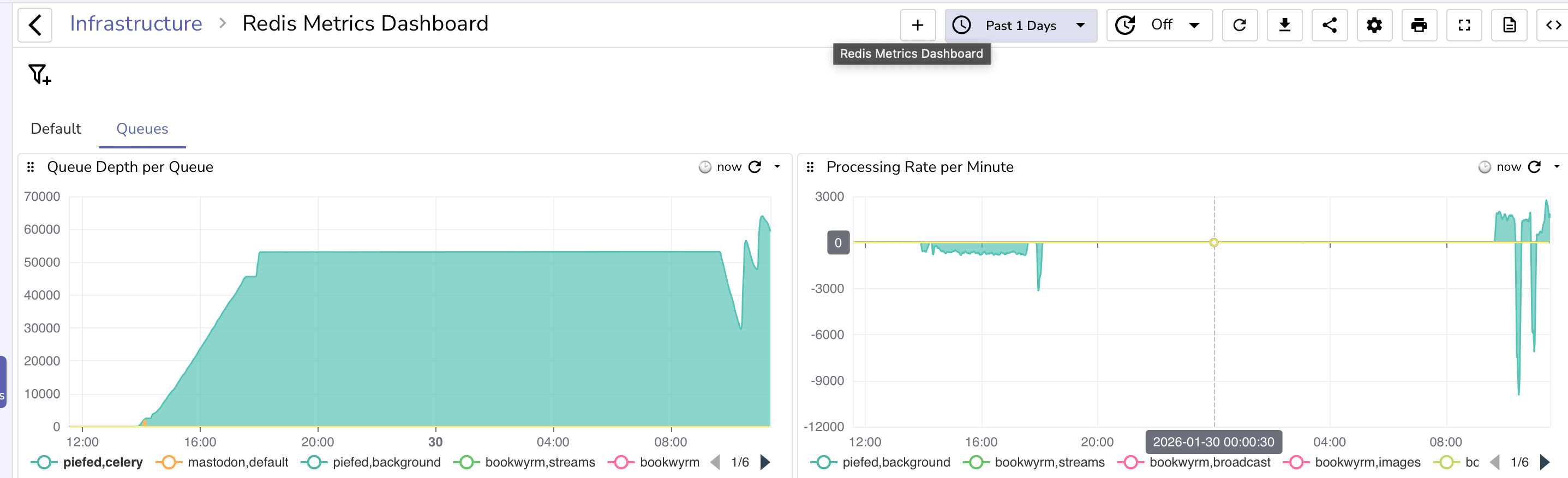
I noticed the next morning that I wasn't seeing any new posts, so I figured the worker was stuck and, sure enough, I checked the redis queue and saw it stuck at ~53k items.
image

Piefed will stop publishing items to the queue when the redis queue reaches 200MB in size and return 429 rate limit http responses.

Solution: restart and then processing started, but I was wondering about pod scaling.

The thing about scaling the worker is that piefed scales internally from 1-5 workers, so vertical scaling is preferred over horizontal, especially since redis doesn't ensure processing order like Kafka does, so by adding a new pod, I could create a situation where one pod pulls a post create, the next pulls an upvote, but the upvote gets processed before creating the post. So normally, you wouldn't want to scale horizontally, but there is a use case for doing it: something gets stuck.

In the past, the queue had blown up due to one or more lemmy servers going down and message processing stalling. I solved that at the time with multiple parallel worker pods so that at least some of the workers would likely not get stuck. Doing something similar could help in this current case, where the first worker wasn't processing queues. Now, the ultimate item on the to-do list is that I should make that pod return redis connectivity as part of the health check so that it'll get restarted if redis fails. (I'll be doing that after this blog post)

My up until today current version of horizontal scaling was on cpu and memory usage, but I never hit those limits, so it never triggered. I was working with Claude on it when it introduced me to KEDA, Kubernetes Event Driven Autoscaling. https://keda.sh/. This looks like what I need.

Installation was pretty simple, https://keda.sh/docs/2.18/deploy/, you can use a helm chart or run kubectl apply --server-side -f https://github.com/kedacore/keda/releases/download/v2.18.3/keda-2.18.3.yaml and it takes care of it. I had Claude create a kustomization file:

---
apiVersion: kustomize.config.k8s.io/v1beta1
kind: Kustomization

namespace: keda-system

resources:
  - https://github.com/kedacore/keda/releases/download/v2.18.3/keda-2.18.3.yaml

patches:
  # Custom patches to change the namespace to keda-system to be consistent with my other namespace patterns
  - path: patches/clusterrolebinding-keda-operator-namespace.yaml
  - path: patches/clusterrolebinding-keda-system-auth-delegator-namespace.yaml
  - path: patches/rolebinding-keda-auth-reader-namespace.yaml
  - path: patches/apiservice-external-metrics-namespace.yaml
  - path: patches/validatingwebhook-namespace.yaml

And the patches aren't necessary, but they look like the below just because I want that namespace.

apiVersion: apiregistration.k8s.io/v1
kind: APIService
metadata:
  name: v1beta1.external.metrics.k8s.io
spec:
  service:
    namespace: keda-system

After that, there's a scaledobject in Kubernetes that you can configure:

---
# KEDA ScaledObject for PieFed Worker - Queue-Based Autoscaling

apiVersion: keda.sh/v1alpha1
kind: ScaledObject
metadata:
  name: piefed-worker-scaledobject
  namespace: piefed-application
  labels:
    app.kubernetes.io/name: piefed
    app.kubernetes.io/component: worker
spec:
  scaleTargetRef:
    name: piefed-worker
  minReplicaCount: 1
  maxReplicaCount: 2 
  cooldownPeriod: 600  # 10 minutes before scaling down (conservative)
  pollingInterval: 30  # Check queue every 30 seconds
  advanced:
    horizontalPodAutoscalerConfig:
      behavior:
        scaleDown:
          stabilizationWindowSeconds: 600  # Wait 10 min before scaling down
          policies:
          - type: Percent
            value: 50
            periodSeconds: 60
          selectPolicy: Max
        scaleUp:
          stabilizationWindowSeconds: 120  # Wait 2 min before scaling up
          policies:
          - type: Pods
            value: 1
            periodSeconds: 60
          selectPolicy: Max
  triggers:
  - type: redis
    metadata:
      address: redis-ha-haproxy.redis-system.svc.cluster.local:6379
      listName: celery  # Main Celery queue
      listLength: '40000'  # Scale up when queue exceeds 40k tasks per pod. Piefed stops pushing to redis at 200MB, 53k messages the last time it got blocked.
      databaseIndex: "0"  # Redis database number (0 for PieFed Celery broker)
    authenticationRef:
      name: keda-redis-trigger-auth-piefed

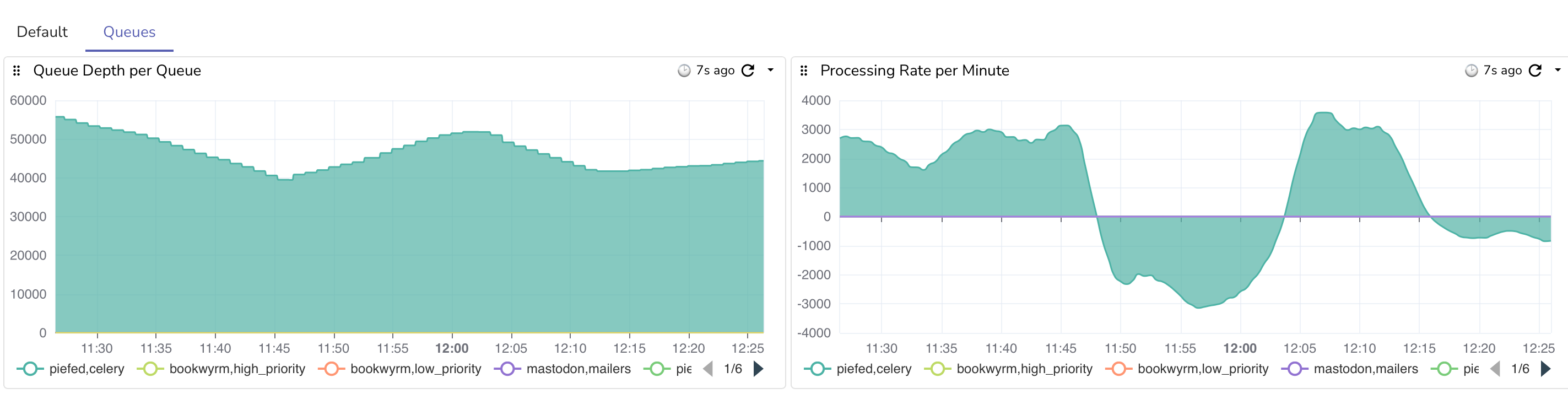
This will scale when 40k messages are in the queue, which should only happen when something isn't getting processed, and will scale up to a second pod only. So, in the event that a pod gets stuck, at least things should gradually be kept moving.

When I got to this point, I decided to implement my restart idea, but Claude gave a different suggestion to use the Celery worker's retries, so it added

- name: CELERY_BROKER_CONNECTION_MAX_RETRIES
  value: "10"  # Exit worker after 10 failed reconnects → pod restart
- name: CELERY_BROKER_TRANSPORT_OPTIONS
  value: '{"socket_timeout": 10, "socket_connect_timeout": 5, "health_check_interval": 30}'

A new startup probe, sure why not

startupProbe:
          exec:
            command:
            - python
            - -c
            - "import os,redis,urllib.parse; u=urllib.parse.urlparse(os.environ['CELERY_BROKER_URL']); r=redis.Redis(host=u.hostname, port=u.port, password=u.password, db=int(u.path[1:]) if u.path else 0); r.ping()"
          initialDelaySeconds: 10
          periodSeconds: 10
          timeoutSeconds: 5
          failureThreshold: 30

and it changed a few thresholds for checking liveliness, which I thought looked fine.

The current state of things is that once the number of records started going down, other servers started federating, which is the spike you see in the graph. There are now 3 web pods and 2 worker pods, vs the typical 2 web pods and 1 worker pod.

The good news is that after scaling out, the total max processed gradually rose from ~1.5k per minute to just under 3k per minute. Once the records fall below 40k and other servers are back to normal federation, things will go back to more normal levels, as a single worker is fine unless things stop and get backed up.

Good job on piefed for returning 429s to keep things from getting too crazy!

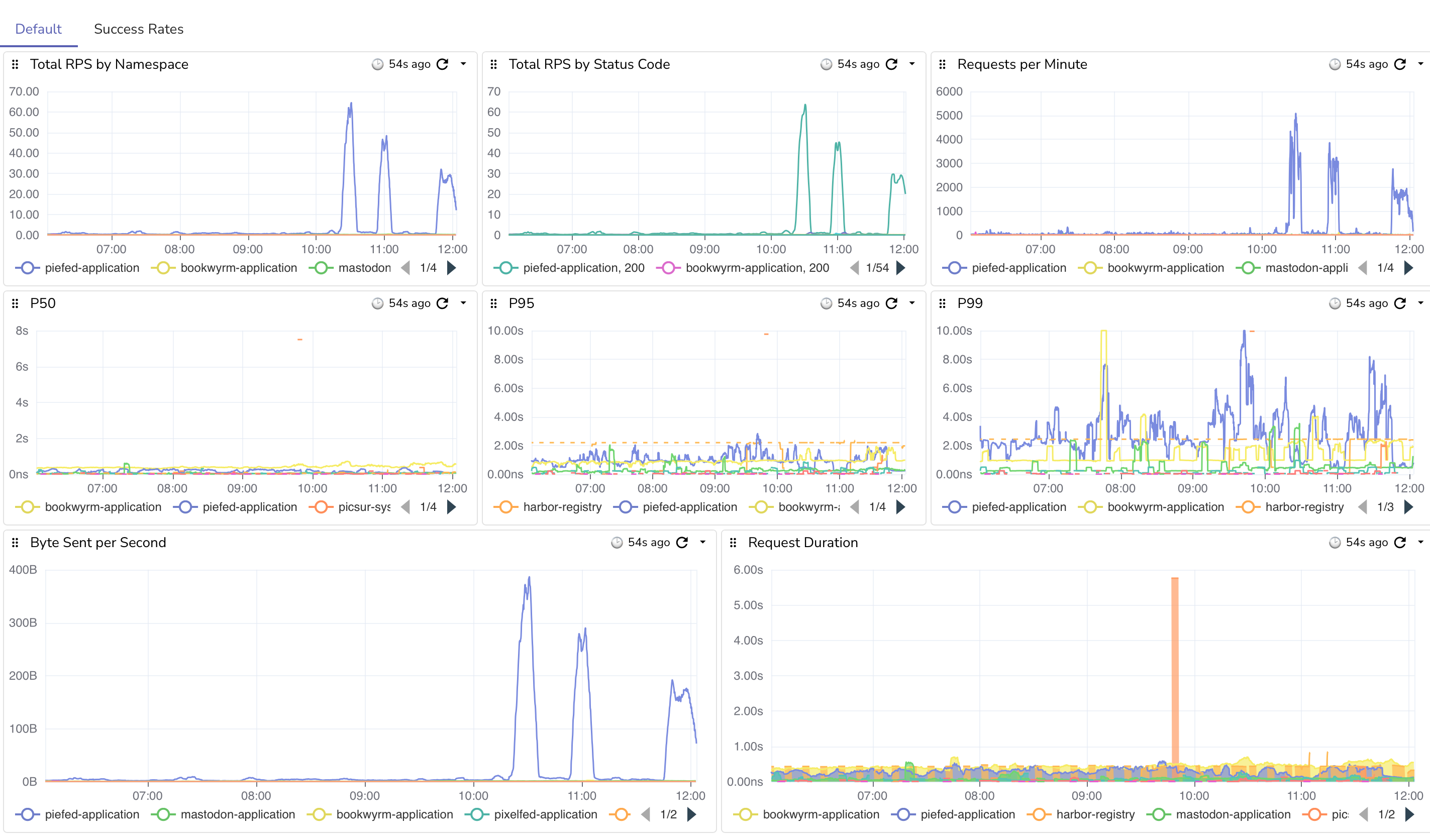
Here are the requests coming in. You can see big spikes once we stopped returning 429's. I do have some nginx rate limiting set up as well to keep things sane. image
Edit: I just ran into a fun thing while doing all of this. I ran out of WAL (Write Ahead Log) space on the storage volume. I gave it 10GB with expansion, so the primary db node started failing at 20.6GB in size. I just doubled the size of the WAL PVC and that resolved. lol.

Edit 2: Fun waves as it hovers around the 40k threshold
#selfhosting #kubernetes #fediverse #yaml #keda #autoscaling #piefed #lemmy #programming #softwaredevelopment #k8s

 
Read more...

from Software and Tech

Edit: The below didn't work. Jump to the edit to see the current attempt.

I'm experimenting with where to put these types of blog posts. I have been putting them on my home server, at gotosocial.michaeldileo.org, but I'm thinking of moving over here instead of a micro-blogging platform.

Longhorn, the system that is used to manage storage for Keyboard Vagabond, performs regular backups and disaster recovery management. I noticed that on the last few billing cycles, the costs for S3 cloud storage with BackBlaze was about $25 higher than expected, and given that the last two bills were like this, it's not a fluke.

The costs are from s3_list_objects, over 5M calls last month. It turns out this is a common thing that has been mentioned in github, reddit, Stack Overflow, etc. The solution seems to be just to turn it off. It doesn't seem to be required for backups and disaster recovery to work and Longhorn seems to be doing something very incorrectly to be making all of these calls.

...
data:
    default-resource.yaml: |-
        ...
        "backupstore-poll-interval": "0"

My expectation is that future billing cycles should be well under $10/month for storage. The current daily average storage size is 563GB, or $3.38 per month.

#kubernetes #longhorn #s3 #programming #selfhosting #cloudnative #keyboardvagabond

Edit – the above didn't work (new solution below)

Ok, so the network policy did block the external traffic, but it also blocked some internet traffic that caused the pods to not be in a ready state. I've been playing around with variations of different ports, but I haven't found a full solution yet. I'll update if I get it resolved. I got it. I had to switch to a CiliumNetworkPolicy

I also tried changing the polling interval from 0 to 86400, though I think the issue is ultimately how they do the calls, so bear this in mind if you use Longhorn. Right now I'm toying around with the idea of setting a cap, since my backups happen after midnight, so maybe gamble on the cap getting reset and then a backup happening, then at some point the cap gets hit and further calls fail until the morning? This might be a bad idea, but I think that I could at least limit my daily expenditure.

One thing to note from what I read in various docs is that in Longhorn v1.10.0, they removed the polling configuration variable since you can set it in the UI. I still haven't solved the issue, ultimately.

I see that yesterday longhorn made 145,000 Class C requests (s3-list-objects). I found on a github issue that someone solved the issue be setting a network policy to block egress outside of those hours. I had Claude draw up some policies, configurations, and test scripts to monitor/observe the different system states. The catch, though, is that I use FluxCD to maintain state and configuration, so this policy cannot be managed by flux.

The gist is that a blocking network policy is created manually, then there are two cron jobs: one to delete the policy 5 minutes before backup, and another to recreate it 3 hours later. I'm hoping this will be a solution.

Edit: I think that I finally got it. I had to switch from a NetworkPolicy to CiliumNetworkPolicy, since that's what I'm using (duh?). using toEntities: kube-apiserver fixed a lot of issues. Here's what I have below. It's the blocking network configuration and the cron jobs to remove and re-create it. I still have a billing cap in place for now. I found that all volumes backed up after the daily reset. I'm going to keep it for a few days and then consider whether to remove it or not. I now at least feel better about being a good citizen and not hammering APIs unnecessarily.

---
# NetworkPolicy: Blocks S3 access by default
# This is applied initially, then managed by CronJobs below
# Using CiliumNetworkPolicy for better API server support via toEntities
apiVersion: cilium.io/v2
kind: CiliumNetworkPolicy
metadata:
  name: longhorn-block-s3-access
  namespace: longhorn-system
  labels:
    app: longhorn
    purpose: s3-access-control
spec:
  description: "Block external S3 access while allowing internal cluster communication"
  endpointSelector:
    matchLabels:
      app: longhorn-manager
  egress:
    # Allow DNS to kube-system namespace
    - toEndpoints:
      - matchLabels:
          k8s-app: kube-dns
      toPorts:
      - ports:
        - port: "53"
          protocol: UDP
        - port: "53"
          protocol: TCP
    # Explicitly allow Kubernetes API server (critical for Longhorn)
    # Cilium handles this specially - kube-apiserver entity is required
    - toEntities:
      - kube-apiserver
    # Allow all internal cluster traffic (10.0.0.0/8)
    # This includes:
    # - Pod CIDR: 10.244.0.0/16
    # - Service CIDR: 10.96.0.0/12 (API server already covered above)
    # - VLAN Network: 10.132.0.0/24
    # - All other internal 10.x.x.x addresses
    - toCIDR:
      - 10.0.0.0/8
    # Allow pod-to-pod communication within cluster
    # The 10.0.0.0/8 CIDR block above covers all pod-to-pod communication
    # This explicit rule ensures instance-manager pods are reachable
    - toEntities:
      - cluster
    # Block all other egress (including external S3 like Backblaze B2)
---
# RBAC for CronJobs that manage the NetworkPolicy
apiVersion: v1
kind: ServiceAccount
metadata:
  name: longhorn-netpol-manager
  namespace: longhorn-system
---
apiVersion: rbac.authorization.k8s.io/v1
kind: Role
metadata:
  name: longhorn-netpol-manager
  namespace: longhorn-system
rules:
- apiGroups: ["cilium.io"]
  resources: ["ciliumnetworkpolicies"]
  verbs: ["get", "create", "delete"]
---
apiVersion: rbac.authorization.k8s.io/v1
kind: RoleBinding
metadata:
  name: longhorn-netpol-manager
  namespace: longhorn-system
roleRef:
  apiGroup: rbac.authorization.k8s.io
  kind: Role
  name: longhorn-netpol-manager
subjects:
- kind: ServiceAccount
  name: longhorn-netpol-manager
  namespace: longhorn-system
---
# CronJob: Remove NetworkPolicy before backups (12:55 AM daily)
# This allows S3 access during the backup window
apiVersion: batch/v1
kind: CronJob
metadata:
  name: longhorn-enable-s3-access
  namespace: longhorn-system
  labels:
    app: longhorn
    purpose: s3-access-control
spec:
  # Run at 12:55 AM daily (5 minutes before earliest backup at 1:00 AM Sunday weekly)
  schedule: "55 0 * * *"
  successfulJobsHistoryLimit: 2
  failedJobsHistoryLimit: 2
  concurrencyPolicy: Forbid
  jobTemplate:
    spec:
      template:
        metadata:
          labels:
            app: longhorn-netpol-manager
        spec:
          serviceAccountName: longhorn-netpol-manager
          restartPolicy: OnFailure
          containers:
          - name: delete-netpol
            image: bitnami/kubectl:latest
            imagePullPolicy: IfNotPresent
            command:
            - /bin/sh
            - -c
            - |
              echo "Removing CiliumNetworkPolicy to allow S3 access for backups..."
              kubectl delete ciliumnetworkpolicy longhorn-block-s3-access -n longhorn-system --ignore-not-found=true
              echo "S3 access enabled. Backups can proceed."
---
# CronJob: Re-apply NetworkPolicy after backups (4:00 AM daily)
# This blocks S3 access after the backup window closes
apiVersion: batch/v1
kind: CronJob
metadata:
  name: longhorn-disable-s3-access
  namespace: longhorn-system
  labels:
    app: longhorn
    purpose: s3-access-control
spec:
  # Run at 4:00 AM daily (gives 3 hours 5 minutes for backups to complete)
  schedule: "0 4 * * *"
  successfulJobsHistoryLimit: 2
  failedJobsHistoryLimit: 2
  concurrencyPolicy: Forbid
  jobTemplate:
    spec:
      template:
        metadata:
          labels:
            app: longhorn-netpol-manager
        spec:
          serviceAccountName: longhorn-netpol-manager
          restartPolicy: OnFailure
          containers:
          - name: create-netpol
            image: bitnami/kubectl:latest
            imagePullPolicy: IfNotPresent
            command:
            - /bin/sh
            - -c
            - |
              echo "Re-applying CiliumNetworkPolicy to block S3 access..."
              kubectl apply -f - <<EOF
              apiVersion: cilium.io/v2
              kind: CiliumNetworkPolicy
              metadata:
                name: longhorn-block-s3-access
                namespace: longhorn-system
                labels:
                  app: longhorn
                  purpose: s3-access-control
              spec:
                description: "Block external S3 access while allowing internal cluster communication"
                endpointSelector:
                  matchLabels:
                    app: longhorn-manager
                egress:
                # Allow DNS to kube-system namespace
                - toEndpoints:
                  - matchLabels:
                      k8s-app: kube-dns
                  toPorts:
                  - ports:
                    - port: "53"
                      protocol: UDP
                    - port: "53"
                      protocol: TCP
                # Explicitly allow Kubernetes API server (critical for Longhorn)
                - toEntities:
                  - kube-apiserver
                # Allow all internal cluster traffic (10.0.0.0/8)
                - toCIDR:
                  - 10.0.0.0/8
                # Allow pod-to-pod communication within cluster
                # The 10.0.0.0/8 CIDR block above covers all pod-to-pod communication
                - toEntities:
                  - cluster
                # Block all other egress (including external S3)
              EOF
              echo "S3 access blocked. Polling stopped until next backup window."
 
Read more...