Reader

Welcome to Keyboard Vagabond, the blogging platform of the Keyboard Vagabond fediverse community for nomads and travelers! To get started, check out the About page and for background see Why Keyboard Vagabond.

To sign up, send an email with why you became or want to become a nomad to admin@mail.keyboardvagabond.com, this helps us keep spam out of the system. 😊

This is the Reader, see the latest posts from our users here!

from Software and Tech

I recently caused myself a bit of a minor issue by installing some updates on the Keyboard Vagabond cluster. It wasn't a big deal, just some version number updates from a project called renovate that automatically creates pull requests when package versions that you use get updated. Doing this did trigger a restart on the redis cluster, which means that different services may need to be restarted because their redis connection strings get stale. I had restarted the piefed-worker pod, but the update didn't seem to stick and I didn't realize it.

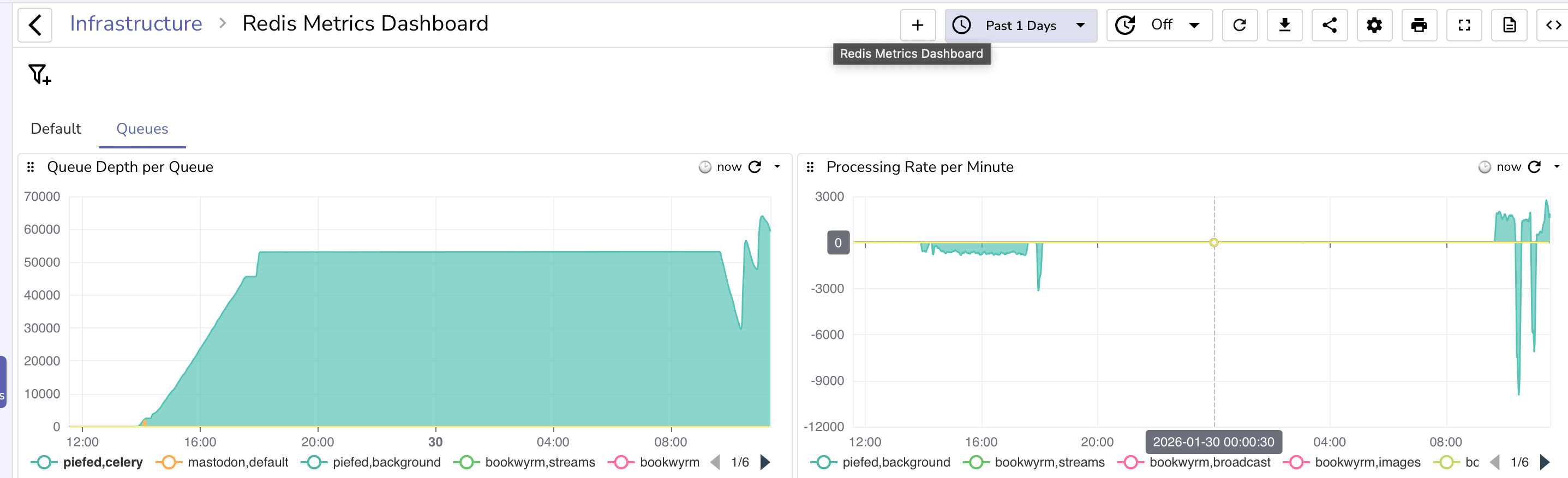
I noticed the next morning that I wasn't seeing any new posts, so I figured the worker was stuck and, sure enough, I checked the redis queue and saw it stuck at ~53k items.

image

Piefed will stop publishing items to the queue when the redis queue reaches 200MB in size and return 429 rate limit http responses.

Solution: restart and then processing started, but I was wondering about pod scaling.

The thing about scaling the worker is that piefed scales internally from 1-5 workers, so vertical scaling is preferred over horizontal, especially since redis doesn't ensure processing order like Kafka does, so by adding a new pod, I could create a situation where one pod pulls a post create, the next pulls an upvote, but the upvote gets processed before creating the post. So normally, you wouldn't want to scale horizontally, but there is a use case for doing it: something gets stuck.

In the past, the queue had blown up due to one or more lemmy servers going down and message processing stalling. I solved that at the time with multiple parallel worker pods so that at least some of the workers would likely not get stuck. Doing something similar could help in this current case, where the first worker wasn't processing queues. Now, the ultimate item on the to-do list is that I should make that pod return redis connectivity as part of the health check so that it'll get restarted if redis fails. (I'll be doing that after this blog post)

My up until today current version of horizontal scaling was on cpu and memory usage, but I never hit those limits, so it never triggered. I was working with Claude on it when it introduced me to KEDA, Kubernetes Event Driven Autoscaling. https://keda.sh/. This looks like what I need.

Installation was pretty simple, https://keda.sh/docs/2.18/deploy/, you can use a helm chart or run kubectl apply --server-side -f https://github.com/kedacore/keda/releases/download/v2.18.3/keda-2.18.3.yaml and it takes care of it. I had Claude create a kustomization file:

---
apiVersion: kustomize.config.k8s.io/v1beta1
kind: Kustomization

namespace: keda-system

resources:
  - https://github.com/kedacore/keda/releases/download/v2.18.3/keda-2.18.3.yaml

patches:
  # Custom patches to change the namespace to keda-system to be consistent with my other namespace patterns
  - path: patches/clusterrolebinding-keda-operator-namespace.yaml
  - path: patches/clusterrolebinding-keda-system-auth-delegator-namespace.yaml
  - path: patches/rolebinding-keda-auth-reader-namespace.yaml
  - path: patches/apiservice-external-metrics-namespace.yaml
  - path: patches/validatingwebhook-namespace.yaml

And the patches aren't necessary, but they look like the below just because I want that namespace.

apiVersion: apiregistration.k8s.io/v1
kind: APIService
metadata:
  name: v1beta1.external.metrics.k8s.io
spec:
  service:
    namespace: keda-system

After that, there's a scaledobject in Kubernetes that you can configure:

---
# KEDA ScaledObject for PieFed Worker - Queue-Based Autoscaling

apiVersion: keda.sh/v1alpha1
kind: ScaledObject
metadata:
  name: piefed-worker-scaledobject
  namespace: piefed-application
  labels:
    app.kubernetes.io/name: piefed
    app.kubernetes.io/component: worker
spec:
  scaleTargetRef:
    name: piefed-worker
  minReplicaCount: 1
  maxReplicaCount: 2 
  cooldownPeriod: 600  # 10 minutes before scaling down (conservative)
  pollingInterval: 30  # Check queue every 30 seconds
  advanced:
    horizontalPodAutoscalerConfig:
      behavior:
        scaleDown:
          stabilizationWindowSeconds: 600  # Wait 10 min before scaling down
          policies:
          - type: Percent
            value: 50
            periodSeconds: 60
          selectPolicy: Max
        scaleUp:
          stabilizationWindowSeconds: 120  # Wait 2 min before scaling up
          policies:
          - type: Pods
            value: 1
            periodSeconds: 60
          selectPolicy: Max
  triggers:
  - type: redis
    metadata:
      address: redis-ha-haproxy.redis-system.svc.cluster.local:6379
      listName: celery  # Main Celery queue
      listLength: '40000'  # Scale up when queue exceeds 40k tasks per pod. Piefed stops pushing to redis at 200MB, 53k messages the last time it got blocked.
      databaseIndex: "0"  # Redis database number (0 for PieFed Celery broker)
    authenticationRef:
      name: keda-redis-trigger-auth-piefed

This will scale when 40k messages are in the queue, which should only happen when something isn't getting processed, and will scale up to a second pod only. So, in the event that a pod gets stuck, at least things should gradually be kept moving.

When I got to this point, I decided to implement my restart idea, but Claude gave a different suggestion to use the Celery worker's retries, so it added

- name: CELERY_BROKER_CONNECTION_MAX_RETRIES
  value: "10"  # Exit worker after 10 failed reconnects → pod restart
- name: CELERY_BROKER_TRANSPORT_OPTIONS
  value: '{"socket_timeout": 10, "socket_connect_timeout": 5, "health_check_interval": 30}'

A new startup probe, sure why not

startupProbe:
          exec:
            command:
            - python
            - -c
            - "import os,redis,urllib.parse; u=urllib.parse.urlparse(os.environ['CELERY_BROKER_URL']); r=redis.Redis(host=u.hostname, port=u.port, password=u.password, db=int(u.path[1:]) if u.path else 0); r.ping()"
          initialDelaySeconds: 10
          periodSeconds: 10
          timeoutSeconds: 5
          failureThreshold: 30

and it changed a few thresholds for checking liveliness, which I thought looked fine.

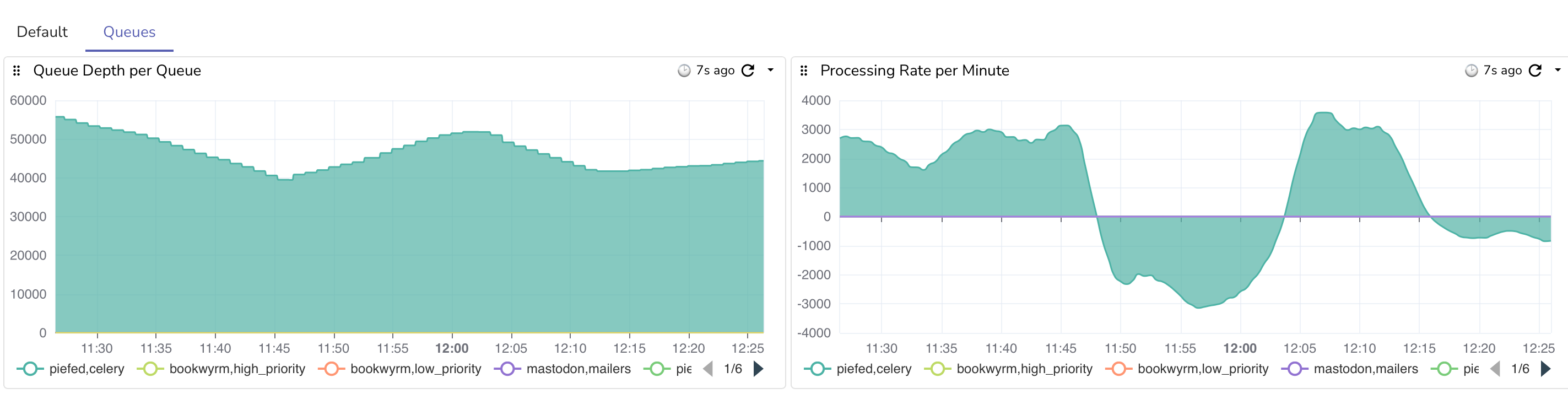
The current state of things is that once the number of records started going down, other servers started federating, which is the spike you see in the graph. There are now 3 web pods and 2 worker pods, vs the typical 2 web pods and 1 worker pod.

The good news is that after scaling out, the total max processed gradually rose from ~1.5k per minute to just under 3k per minute. Once the records fall below 40k and other servers are back to normal federation, things will go back to more normal levels, as a single worker is fine unless things stop and get backed up.

Good job on piefed for returning 429s to keep things from getting too crazy!

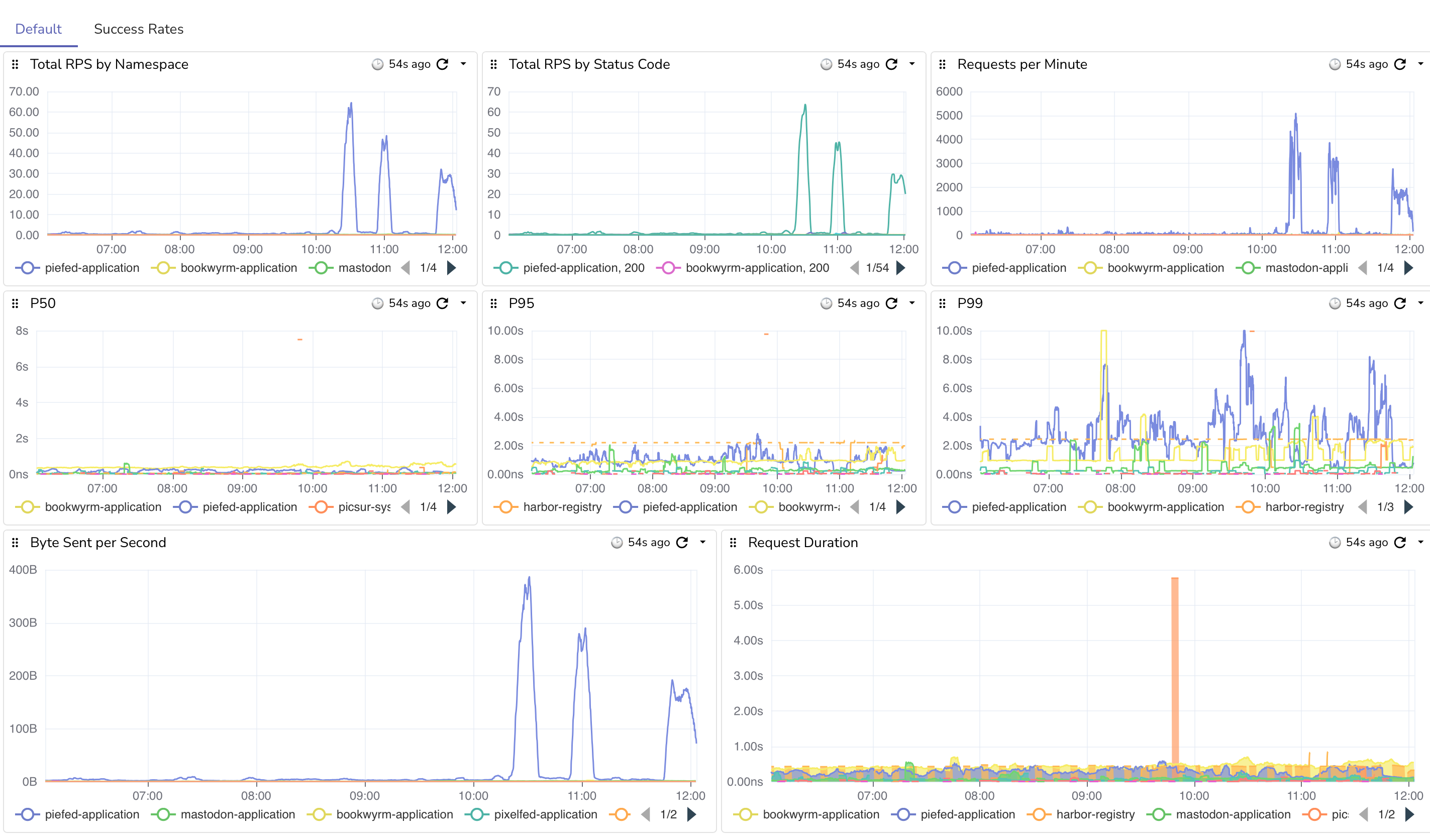
Here are the requests coming in. You can see big spikes once we stopped returning 429's. I do have some nginx rate limiting set up as well to keep things sane. image

Edit: I just ran into a fun thing while doing all of this. I ran out of WAL (Write Ahead Log) space on the storage volume. I gave it 10GB with expansion, so the primary db node started failing at 20.6GB in size. I just doubled the size of the WAL PVC and that resolved. lol.

Edit 2: Fun waves as it hovers around the 40k threshold

#selfhosting #kubernetes #fediverse #yaml #keda #autoscaling #piefed #lemmy #programming #softwaredevelopment #k8s

 
Read more...

from Michael DiLeo

It is not uncommon for those who travel as the main avenue for their lifestyle to eventually become burned out. The temptation to see and do everything or the FOMO makes it difficult to stay in one place and rest. There is so much to explore! New people, new places, new food! New, new, new, new!

But the one common thing that every long term traveler says to newcomers is “SLOW DOWN!” I am currently hitting that phase myself, but I will add my own opinion that it may not be entirely necessary to travel slowly right away. When beginning travel there is a lot of energy because everything is fresh and this way of living is new. You can travel this way for a while, but it does become tiring.

You become tired of connecting with people and saying goodbye. You become tired from all of the moving around. You become tired because you wake up in the middle of the night and don't remember what country you're in, much less your hostel or colive, or which side of the bed the wall is on. It can feel like you hit a wall and it forces some people to slow down and others choose to stop traveling for a while or all together. I asked other nomads about their experiences with hitting the wall and got some feedback that I didn't necessarily expect.

A few people said that they never hit the wall because they traveled slowly from the start. They prioritized community from the beginning and spend multiple months in a given place. One person said that they spread out the planning stage of travel because having to do it all at once every month or so feels exhausting. Another said that their “currency” is the decision making and that having to plan flights, find neighborhoods, lodging, transportation, etc is is a lot of mental work that can cause them to hit a wall. Others found respite in returning to familiar places rather than chasing “new,” which allows them to have a community in that place. Most of the responses included this common thing – community.

Community is arguably one of our strongest needs and was a recurring theme for respondents and for myself, as well. The running theme among nomads is that they eventually want to have familiar and consistent connections with people. They want to have a community and coliving style life for more time. One month can sound like a lot, but for nomads it really isn't. Time flies and our needs for connection go beyond four short weeks.

So, what is one to do when they hit a wall, or to avoid hitting it? I hit mine at 2 years because I had to return to the US and did a lot of fast travel for a year. The US is not ideal for travelers and nomads and the hostels are relatively few, hotels are expensive, and coliving sites are non-existent. I came to a point where I was in the Netherlands and hardly wanted to leave my bed, but I had more places to go and friends to visit before my coliving in Tarifa, Spain would start. The answer to the question is what every experienced traveler says: slow down. Being able to recognize your needs and listening to your mind and body are important. For this year, 2026, I am going to focus more on slower travel with known people. My original plan was to go to Asia, which I may still do, but even after a month of being in a colive in Tarifa, I'm not ready to hit the road. The emotional load is still a bit strong and my energy hasn't recovered yet. I want to be a lazy bum, which is OK, though I don't want to go too far and fall into a pit with it.

My plans this year are to do more with the Wifi Tribe, to slow down and spend more time with people. I'm hoping that I may really hit it off with some new friends and see them longer than a month at a time, but we'll see. I may still go to Asia, but that's a problem for future Michael when he goes to Namibia in January on a Wifi Tribe chapter. But I suppose my real goal is to foster good relationships and connections. It can be hard while traveling, but one benefit of coliving is that you see people more frequently than when back home. I can see people throughout the day rather than waiting until the weekend. I think this year will be a good one. 🤞

#travel #digitalnomad #nomad #nomading #colive #loneliness #resting #blog

 
Read more...

from Software and Tech

It started with a perfectly good and running kubernetes cluster hosting fediverse applications at keyboardvagabond with all the infrastructure and observability that comes with it. I've worked in kubernetes environments for a while, but lacked being able to see how everything comes together and what it means; I also wanted to host some fediverse software for the digital nomad community.

I followed a guide on bare metal kubernetes setup with hetzner (though you should definitely NOT change cluster.local like it says) with some changes, adjustments, and modifications over time to suite my scenario. While I was getting up and running with my 3 cluster VPS servers, I became nervous about resource usage. The applications that I host are currently more ram needy than cpu and the nodes with all of the applications were using ~12GB out of the 16GB available. I decided to make 2 of the 3 nodes worker nodes and have one control plane node. The control plane is the one that determines what the other nodes are doing and hosting. Put a pin in this, it'll come back later.

I also was able to migrate from DNS entries on exposed ports to Cloudflare tunnels and Tailscale for VPN access. This means that no one can try to input commands on the Talos or Kubernetes ports, as they're no longer exposed. You'd need to figure out the encryption key to be able to do it, but now it's even safer. Put a pin in that.

This has been very much a learning process for me in a lot of ways, and I hope that I haven't forgotten too much – it's funny how memory is. I've been taking a lot of notes and having claude/cursor draw up summaries that I leave lying around. It's funny how much sense your documentation makes until you come back 3 months later.

One of the issues that was in the back of my mind was that I had configured the Talos configuration launch kubernetes with the port number specified and I was using the external IP. This was a mistake, because it meant that the nodes were primarily communicating with each other externally rather than over the VLAN, or the internal network. Internal traffic still happened, as I believe that service to service communication would go via kubernetes to a local IP. However, I eventually got a broken dashboard working that showed me the network traffic by device, but it was all on eth0, the external ethernet, not the VLAN. I then checked the dashboards on the provider and it showed 1.8TB of internet usage. That's within my budget, thankfully, but way too much for a single-user cluster, as I had not yet announced the services as open to the public.

I wanted to get this working before going live, so I figured that I would start with n3, one of the workers. I have an encrypted copy of the Talos machine config, but couldn't decrypt it, so I copied n2, changed the IP to the internal 10.132.0.30, and applied...... I forgot to change the host name from n2 to n3.

No biggie, I'll change it and apply....timeouts. Tailscale is no longer connected to the cluster. I spent an hour trying to get access, working with Claude for ideas and work-arounds. No dice. I believe what happened was that in the confusion of 2 nodes with the same name, Tailscale was likely running on n3 and was no longer accessible and the weird state of things caused it to not be spun up on the other nodes. If it wasn't a weird state it was because at my scaling with redundant services and two nodes don't have the RAM available to handle everything from a failed node. But either way, I had to get back in to the cluster.

I went into the VPS dashboard and rebooted the server into recovery mode, wiped the drive, re-installed, and tried to re-join the cluster. This should have been fine as I ensure that there are 2 copies of all storage volume across the nodes in addition to nightly s3 backups. In hind-sight, I might have been better rebooting talos into maintenance mode. But it didn't rejoin the cluster. It turns out that I was missing a particular network configuration that would allow a foreign node to join. That doesn't happen automatically, there's allow-listing for the IP address and some other network policies that need to exist to allow it and I was missing one for one of the talos ports.

I need to get to the control plane node, n1. I rebooted into Talos maintenance mode and apply the new configuration, but it's logging that it can't join a cluster and that I need to bootstrap it to join. I guess that makes sense, it was the only control plane. I get it up and running and progressively add n3 and n2 and they re-join. I reinstall the basic infrastructure to get running and then let FluxCD restart all of the services. The majority boot up, but I notice that a couple of services are blank. No existing data.

I check the longhorn UI, which is what I use to manage storage, and I don't see a lot of volumes, but I see about 50 orphans.... Crap. All volumes were orphaned. When I put n1 into maintenance mode and then bootstrapped, I thought that longhorn would see the volumes and put them back with the services that they belonged to. However, when I redid n1, etcd, the part that manages cluster resources, was cleared and all that storage information lost who and what it belonged to. Learning is painful sometimes.

I tried to take a look at the volumes, but Talos is pretty minimal, so Claude made a pod with alpine and XFS (my file-system) tools that would attach a specific orphan volume, mount it, and try to look at the contents to see what it belonged to. Some things were fairly easy to identify, such as the WriteFreely blog, which is one of the first services that I loaded and uses its own SQLite database. I got that up and running. I also use harbor registry to be a mirror proxy and allow me to privately push my own builds – it was all 0s, or at least the first 100MB were. That's not a huge deal. The database volumes were intact, but I couldn't really get those running, so I'd have to re-create it.

I gradually got these services running and re-configured. Once Harbor is up, images should start getting pulled and cached. But redis failed to pull. That's weird.

But first let me get the database running with CloudNative Postgres. I got it up, but the database was empty, so back to looking at orphans. The tricky thing here is that a few applications have their own postgres databases, such as Harbor Registry. So instead of looking at the file structure I also had to find out what tables were there, but even when I found them, I didn't know which orphan belonged to the primary rather than a replica. In the end, I decided to restore the latest nightly backup and then had Claude arrange a “swap” where it replaces the current “volume claim” with a pinned “volume” name. Essentially, the database pod has a PVC (persistence volume claim) and I want to have the claim that is used be pointed to the recovered volume. So I had claude execute those steps, which unfortunately can leave you with a PVC in your source code that has a volume reference, which you can get rid of, but may or may not be immediately worth it. I restarted and postgres shows all of the databases that I expect.

Next is to fix redis. It turns out that not only Harbor was using Bitnami helm charts (pre-made configurations for kubernetes), but so was the redis cluster. I run with a main and 2 replicas on the 3 nodes. It was failing because Bitnami no longer wants to provide free charts, so they moved everything to bitnamilegacy. No biggie, I'll just change the image and repository that's used and it'll load. Redis loaded, but then there was another component called “redis-exporter” for metrics that seemed to ignore the image override. I then spent the next few hours trying to get it to work and experimenting with other helm charts that provide a cluster arrangement. I settled on one and got redis working. I did lose some data as some applications like piefed started running and publishing messages that it received to do work from the 3 days of being off-line. I decided not to try to recover that. Oh well, it's only social media. Once I go live there will be more current things to look at. It was a pain, though.

After this, I spent quite a few hours fixing small issues with getting FluxCD to reconcile the state of things, especially since I had made changes to PVCs, which are immutable. That took quite a few more hours to either recreate or undo changes so that FluxCD was happy. Eventually everything came online despite me hitting Docker rate limits. I rebuilt the rest of the various fediverse apps, as I have custom builds for Bookwyrm (books), Piefed (reddit), and Pixelfed (instagram) for my kubernetes cluster.

I then began to rebuild the dashboards that I had lost. I still don't have all of them, but at least now that networking tab show a LOT of devices, including the VLAN. Mission accomplished? I did do one extra and got a log view of long-running queries from different apps that I could annoy the developers with, but they look like some easy fixes with some indexes and light code changes, hopefully.

I still need to rebuild the redis dashboards, as I had some metrics for the different event queues that the apps use, which I could use to monitor is something bad happened. On ocassion, if another server fails to respond, it could cause a queue backup, as I don't believe the varioius apps are “grouping” by domain name, which is a feature with the redis XGROUP command.

Here's a funny thing, though. After getting the services up and running for a couple of days, the RAM usage is the same with 3 control plane nodes as it was with just one, so my worries were for nothing and cost me the cluster.

As part of the recovery, I took the opportunity to create a VIP for talos. This is a static IP address that the different control planes vote on for who is managing. So I changed the talos host from a domain name, such as api.mycluster.com to that IP of 10.132.0.5. I also took the time to migrate from Tailscale's subnet route setup to their operator helm chart. This should let me expose different services over the VPN with a domain name using their MagicDNS system and a meta attribute on the service. I haven't done that yet, though.

This disaster was avoidable and could have been a few minute upgrade if I did everything right, but I was able to take the opportunity to fix some other networking and service issues that I was too afraid to do on a running environment. Now all of my services are communicating over the VLAN, I have a VIP for Talos, Tailscale is upgraded, I've migrated more off of Bitnami, and I can now properly handle a node failure except for full service restarts. I would still have to scale down some things manually for that fail-over. But nobody is making or losing money off of this, except for me and my VPS provider, so good enough.

In the end, I got up and running, and the AI was actually quite helpful for debugging issues and quickly generating commands and templates for volume recovery. It was nice being able to let it either work or run a script to examine the orphan volumes for me. I did have to play around with getting it to create notes to go to new contexts as they would get full quickly once I ran out of Claude usage with my plan. I'm glad I didn't have to type a bunch of stuff myself. Of course, AI is still “that looks about right”, which is a thing that I'm aware of, but it wound up being a useful tool for this recovery.
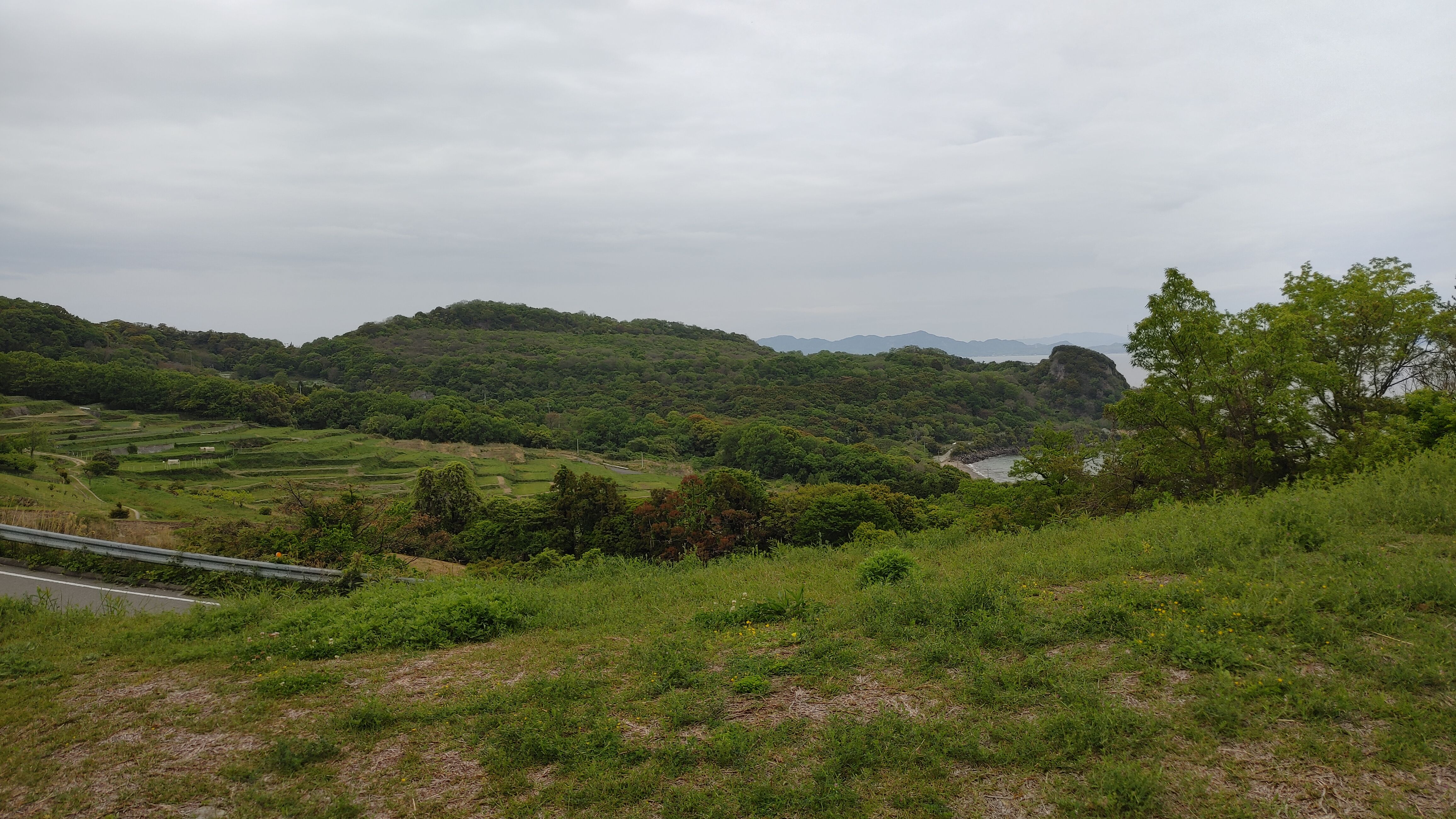
The other thing that helped a good bit was I was actually in another town to visit an old travel friend. Normally I'm the type of person to obsess about a problem until it's solved, but I was there to visit a friend and nobody's livelihood depends on this. So I pulled myself away to go hang and even after just 15 minutes away from the keyboard I'd start getting new ideas or realizing something new. That's one reason the recovery took several days, because I was still living (and obsessing). The mandatory breaks were probably the most helpful things that I could have done – I just don't know how to replicate those.

#talos #kubernetes #selfhosting #fediverse #keyboardvagabond #whybitnamiwhy #cluster #vps #failover #distasterRecovery

 
Read more...

from Michael DiLeo

Earlier in 2025, I joined a group of friends in New Orleans at one of their houses for a writing event for a local library. It was a poetry or writing competition, I believe. Of course, I didn't think I'd get an entry, but it would be fun to write, which I haven't done much of besides the occasional blog post. I had an idea in mind and wanted to keep things abstract enough that people could read into it what they wanted, but not so much that it was lame. I don't know how I did, but I had fun.
Little Dots

There once were two little dots.
Off to one side, once bounces. It likes to bounce up and down and to dart from side to side.

Another dot changes shape and moves. It swings and flows. Normally, they bounce and flow alone, but when they're together, they love to play. They can do things together that they can't do alone.

While one bounces, the other will bend and stretch, and together they fly high into the sky. They will flow and stretch and play. The bouncing dot teaches the flowing dot to dart and the flowing dot teaches the bouncing dot to bend. Together they have so much fun.

One day a line appears. It can spin and swing. It's fast and strong. The dots try to play, but the bouncing and bending are too much for the line. It hits the dots. It wants them apart. To only bounce and dart, to only bend and flow. Not together and never both.

The dots try to play alone and the miss what they can't do when they're alone. They can't go high and far like the used to.

Sometimes they try to do what the other taught them, but the line hits them when it sees. Sometimes one will distract th line and the other will play like it learned from its friend.

It's hard to get away from the line. It's very fast and it won't leave. It's also stronger than either dot. They can't allow the line any further. But they can't stop it alone.

They wait for the line to be away and come up with a plan. The line is fast, but it cannot flow. It is also strong, but it cannot dart. One dot will bend around it while the other pushes it away. So the wait and when the line doesn't expect, they wrap and push, pull and move. But the line is fast. It does not want to leave. It was having fun.

After many tries, and the line escaping, they catch it. The line grows tired – it cannot escape.

We want to play like before! They say. No! says the line. I cannot bend and dart. It's not fun for me! But we cannot spin and swing like you can!

The dots try to convince the line to let them play together. It could be all three or just the two. It can leave and be alone, or play together with the dots. What will you choose?

#blog #blogging #shortstory

 
Read more...

from Software and Tech

Edit: The below didn't work. Jump to the edit to see the current attempt.

I'm experimenting with where to put these types of blog posts. I have been putting them on my home server, at gotosocial.michaeldileo.org, but I'm thinking of moving over here instead of a micro-blogging platform.

Longhorn, the system that is used to manage storage for Keyboard Vagabond, performs regular backups and disaster recovery management. I noticed that on the last few billing cycles, the costs for S3 cloud storage with BackBlaze was about $25 higher than expected, and given that the last two bills were like this, it's not a fluke.

The costs are from s3_list_objects, over 5M calls last month. It turns out this is a common thing that has been mentioned in github, reddit, Stack Overflow, etc. The solution seems to be just to turn it off. It doesn't seem to be required for backups and disaster recovery to work and Longhorn seems to be doing something very incorrectly to be making all of these calls.

...
data:
    default-resource.yaml: |-
        ...
        "backupstore-poll-interval": "0"

My expectation is that future billing cycles should be well under $10/month for storage. The current daily average storage size is 563GB, or $3.38 per month.

#kubernetes #longhorn #s3 #programming #selfhosting #cloudnative #keyboardvagabond

Edit – the above didn't work (new solution below)

Ok, so the network policy did block the external traffic, but it also blocked some internet traffic that caused the pods to not be in a ready state. I've been playing around with variations of different ports, but I haven't found a full solution yet. I'll update if I get it resolved. I got it. I had to switch to a CiliumNetworkPolicy

I also tried changing the polling interval from 0 to 86400, though I think the issue is ultimately how they do the calls, so bear this in mind if you use Longhorn. Right now I'm toying around with the idea of setting a cap, since my backups happen after midnight, so maybe gamble on the cap getting reset and then a backup happening, then at some point the cap gets hit and further calls fail until the morning? This might be a bad idea, but I think that I could at least limit my daily expenditure.

One thing to note from what I read in various docs is that in Longhorn v1.10.0, they removed the polling configuration variable since you can set it in the UI. I still haven't solved the issue, ultimately.

I see that yesterday longhorn made 145,000 Class C requests (s3-list-objects). I found on a github issue that someone solved the issue be setting a network policy to block egress outside of those hours. I had Claude draw up some policies, configurations, and test scripts to monitor/observe the different system states. The catch, though, is that I use FluxCD to maintain state and configuration, so this policy cannot be managed by flux.

The gist is that a blocking network policy is created manually, then there are two cron jobs: one to delete the policy 5 minutes before backup, and another to recreate it 3 hours later. I'm hoping this will be a solution.

Edit: I think that I finally got it. I had to switch from a NetworkPolicy to CiliumNetworkPolicy, since that's what I'm using (duh?). using toEntities: kube-apiserver fixed a lot of issues. Here's what I have below. It's the blocking network configuration and the cron jobs to remove and re-create it. I still have a billing cap in place for now. I found that all volumes backed up after the daily reset. I'm going to keep it for a few days and then consider whether to remove it or not. I now at least feel better about being a good citizen and not hammering APIs unnecessarily.

---
# NetworkPolicy: Blocks S3 access by default
# This is applied initially, then managed by CronJobs below
# Using CiliumNetworkPolicy for better API server support via toEntities
apiVersion: cilium.io/v2
kind: CiliumNetworkPolicy
metadata:
  name: longhorn-block-s3-access
  namespace: longhorn-system
  labels:
    app: longhorn
    purpose: s3-access-control
spec:
  description: "Block external S3 access while allowing internal cluster communication"
  endpointSelector:
    matchLabels:
      app: longhorn-manager
  egress:
    # Allow DNS to kube-system namespace
    - toEndpoints:
      - matchLabels:
          k8s-app: kube-dns
      toPorts:
      - ports:
        - port: "53"
          protocol: UDP
        - port: "53"
          protocol: TCP
    # Explicitly allow Kubernetes API server (critical for Longhorn)
    # Cilium handles this specially - kube-apiserver entity is required
    - toEntities:
      - kube-apiserver
    # Allow all internal cluster traffic (10.0.0.0/8)
    # This includes:
    # - Pod CIDR: 10.244.0.0/16
    # - Service CIDR: 10.96.0.0/12 (API server already covered above)
    # - VLAN Network: 10.132.0.0/24
    # - All other internal 10.x.x.x addresses
    - toCIDR:
      - 10.0.0.0/8
    # Allow pod-to-pod communication within cluster
    # The 10.0.0.0/8 CIDR block above covers all pod-to-pod communication
    # This explicit rule ensures instance-manager pods are reachable
    - toEntities:
      - cluster
    # Block all other egress (including external S3 like Backblaze B2)
---
# RBAC for CronJobs that manage the NetworkPolicy
apiVersion: v1
kind: ServiceAccount
metadata:
  name: longhorn-netpol-manager
  namespace: longhorn-system
---
apiVersion: rbac.authorization.k8s.io/v1
kind: Role
metadata:
  name: longhorn-netpol-manager
  namespace: longhorn-system
rules:
- apiGroups: ["cilium.io"]
  resources: ["ciliumnetworkpolicies"]
  verbs: ["get", "create", "delete"]
---
apiVersion: rbac.authorization.k8s.io/v1
kind: RoleBinding
metadata:
  name: longhorn-netpol-manager
  namespace: longhorn-system
roleRef:
  apiGroup: rbac.authorization.k8s.io
  kind: Role
  name: longhorn-netpol-manager
subjects:
- kind: ServiceAccount
  name: longhorn-netpol-manager
  namespace: longhorn-system
---
# CronJob: Remove NetworkPolicy before backups (12:55 AM daily)
# This allows S3 access during the backup window
apiVersion: batch/v1
kind: CronJob
metadata:
  name: longhorn-enable-s3-access
  namespace: longhorn-system
  labels:
    app: longhorn
    purpose: s3-access-control
spec:
  # Run at 12:55 AM daily (5 minutes before earliest backup at 1:00 AM Sunday weekly)
  schedule: "55 0 * * *"
  successfulJobsHistoryLimit: 2
  failedJobsHistoryLimit: 2
  concurrencyPolicy: Forbid
  jobTemplate:
    spec:
      template:
        metadata:
          labels:
            app: longhorn-netpol-manager
        spec:
          serviceAccountName: longhorn-netpol-manager
          restartPolicy: OnFailure
          containers:
          - name: delete-netpol
            image: bitnami/kubectl:latest
            imagePullPolicy: IfNotPresent
            command:
            - /bin/sh
            - -c
            - |
              echo "Removing CiliumNetworkPolicy to allow S3 access for backups..."
              kubectl delete ciliumnetworkpolicy longhorn-block-s3-access -n longhorn-system --ignore-not-found=true
              echo "S3 access enabled. Backups can proceed."
---
# CronJob: Re-apply NetworkPolicy after backups (4:00 AM daily)
# This blocks S3 access after the backup window closes
apiVersion: batch/v1
kind: CronJob
metadata:
  name: longhorn-disable-s3-access
  namespace: longhorn-system
  labels:
    app: longhorn
    purpose: s3-access-control
spec:
  # Run at 4:00 AM daily (gives 3 hours 5 minutes for backups to complete)
  schedule: "0 4 * * *"
  successfulJobsHistoryLimit: 2
  failedJobsHistoryLimit: 2
  concurrencyPolicy: Forbid
  jobTemplate:
    spec:
      template:
        metadata:
          labels:
            app: longhorn-netpol-manager
        spec:
          serviceAccountName: longhorn-netpol-manager
          restartPolicy: OnFailure
          containers:
          - name: create-netpol
            image: bitnami/kubectl:latest
            imagePullPolicy: IfNotPresent
            command:
            - /bin/sh
            - -c
            - |
              echo "Re-applying CiliumNetworkPolicy to block S3 access..."
              kubectl apply -f - <<EOF
              apiVersion: cilium.io/v2
              kind: CiliumNetworkPolicy
              metadata:
                name: longhorn-block-s3-access
                namespace: longhorn-system
                labels:
                  app: longhorn
                  purpose: s3-access-control
              spec:
                description: "Block external S3 access while allowing internal cluster communication"
                endpointSelector:
                  matchLabels:
                    app: longhorn-manager
                egress:
                # Allow DNS to kube-system namespace
                - toEndpoints:
                  - matchLabels:
                      k8s-app: kube-dns
                  toPorts:
                  - ports:
                    - port: "53"
                      protocol: UDP
                    - port: "53"
                      protocol: TCP
                # Explicitly allow Kubernetes API server (critical for Longhorn)
                - toEntities:
                  - kube-apiserver
                # Allow all internal cluster traffic (10.0.0.0/8)
                - toCIDR:
                  - 10.0.0.0/8
                # Allow pod-to-pod communication within cluster
                # The 10.0.0.0/8 CIDR block above covers all pod-to-pod communication
                - toEntities:
                  - cluster
                # Block all other egress (including external S3)
              EOF
              echo "S3 access blocked. Polling stopped until next backup window."
 
Read more...

from Michael DiLeo

#digitalnomad #nomading #edinburgh #travelblog #blog #blogging #travel

Traveling the UK has been quite a treat. I started in off at a Wifi Tribe reunion get together at a manor in the British countryside and then moved on to Cambridge, London, Oxford, Bristol, and now I'm in Edinburgh getting ready to start a 4 day road trip across the highlands.

It's been a grand time listening to live music, seeing loads of museums, and generally wandering around and taking in the sites. My American self is loving the walkable towns with good public transit. I think I've been putting on weight from beer 😭.

The other thing that's playing a role in me is that this year I've been traveling a lot. I started with about 4 months in New Orleans, my home area, and bouncing around between hostels. I then did a tour up the east coast before going back south to visit friends and family. I then quit my job so that I could travel and work on side projects. That's when I started in the UK. But I haven't had a chance to be in one place, one bed for an extended period this year and it's far overdue. The last time that I did a colive was last November and it's the end of October now. I am signed up for one in December and it can't get here quickly enough.

I keep telling myself that I'll start slow traveling and never do it. The way that you be a nomad is that you have to slow down because you'll just burn out. But there's so much to see! Also, the UK and northern Europe are expensive and I'm not working, so I want to see what I can quickly. I try not to eat out to much, but when I do, the pound to dollar conversion makes me regret it. But I'll probably have to get a job around January or February anyway. I might be able to extend a bit, but we'll see.

Perhaps next year I'll start doing more extended stays and more colives. Maybe I'll start staying longer than a month in places, finally! I'll have to at least for a little bit because I've been traveling for two years now, that's a pretty good stint.

But let me share some reasons why I can't stop moving around.

Holyrood park overlooking Edingburgh Holyrood park/hill overlooking Edingburgh

photo from alley overlooking the lake

ocean side park in the town of Danbury ocean side park in the nearby town of Danbury

overlooking Edinburgh overlooking Edinburgh

night shot overlooking Edinburgh night shot overlooking Edinburgh

Now I'm feeling a bit better, though still tired. So perhaps I should write some more...or play Baldurs Gate again? One of the reasons that I stay in hostels usually is that I often want to be lazy and sit on a couch and not do anything. But what if there is no couch? I guess I better get up and go explore something 🙂 or maybe I could chill at a coffee shop. I would prefer to not lay in bed all day.

 
Read more...

from Michael DiLeo

#neworleans #savannah #charleston #columbia #raleigh #richmond #digitalnomad #travel #usa #cultureshock #reversecultureshock #amtrak #publictransit #bus

Reverse culture shock is when you return to your own country after going abroad and have the feelings of strangeness and bewilderment that you had when you arrived in other countries. My first experience with reverse culture shock was after a month long trip to Japan in which I lived with a host family and went to language classes. When I arrived at the airport, I was aggravated that everyone stood right up the baggage belt, even when their bags weren't there, rather than giving space for others. Then they wouldn't make space on the escalator for people to walk by. But those are super minor things. The next thing that I found was that the smell of American food made me nauseous. I couldn't eat my favorite pizza because the greasy smell made me want to puke. I had a hard time eating anything for a month.

As of January, 2025 I've come back to the US after traveling for a year and half in Latin America – and boy, do I have some reverse culture shock now. And I still do five months later. Some of the first things that I noticed were that the conversations that I overheard were much more rudimentary than what I was used to, to the point that I thought, “Wow, I'm really feeling that national average third grade reading level.” But maybe that was me just being in a bad mood and being a bit dick-ish. The summary of the main difference in conversations in the US vs elsewhere was, as you could probably guess, the political commentary nature of it all.

People all over will occasionally bring up politics. In Ecuador, I was told of various administrations, how one government started on a very populist/socialist note in rhetoric and then took office to become the most corrupt government they'd had with none of the populism. I guess that never changes. In Argentina, things were fresh under Milei's inauguration and austerity policies. Most people I spoke to were upset and concerned and protests against the privatization of universities were everywhere. But some were hopeful of the promise of stability after hardship. Did you know that in the past the Argentinian government tried to privatize universities and people occupied the universities with guns and shot at police to stop it? That's a story.

Back in the US, everything I heard was parrots of major media outlets. People seem to have strong opinions of things without actual understanding of how they work. Perhaps that's universal, though I doubt you could get most Americans to define Capitalism without the use of words like “freedom”, “hard work”, “dreams”, or “justice.”

There seems to be more anger here

While traveling through more than 20 countries in my life, I've never had any bad experiences in hostels with other guests. When I came back to New Orleans, it was almost part of the routine that people would get into tiffs with each other, with staff, with people around them. Courtesy in shared spaces seems to be on a different definition than what I expected. Also, dudes in the US snore more and more loudly. The men's dorm rooms also smell worse. My god, do they get musky quickly. That wasn't a thing nearly as much in Latin America. Sure, some people snored, but Americans take it to a whole new level – even to the point of me checking to see if my ear plugs are working.

But there were other instances. At most hostels I stayed at in New Orleans there was some kind of drama between guests, staff, and workers, in all directions, on a regular basis. There are a couple of hostels in New Orleans that I'm just not going back to. I've never done that before. But it's also the same with people there in general. Even riding a bike along side someone on a road in New Orleans, the guy started yelling at me. I pulled up next to him because the road wasn't safe to ride on and I thought I made a biking buddy.

Thankfully, other places in the US aren't as high-strung as people in New Orleans. I do want to say though, there are plenty of kind people, but there is also a lot of poverty and stress. More-so in the US than in other places I've been, even super poor ones. There are a lot of reasons for that, I think, and poverty being almost illegal here doesn't help. At least other places allow shanty towns, so people can get SOME kind of shelter. I'd see people hanging out nice looking work clothes to dry outside of some piled up bricks and a rudimentary roof. They were poor and doing what they had to get by with what they had. It's not ideal, but it's better than the option in the US, which is none.

But what about some of the good stuff?

There have certainly been good aspects of traveling back in the US and I don't want to spend an entire blog bitching. The food, music, and culture in New Orleans is still some of the best, and despite its problems it's still one of my favorite cities globally. I've also been traveling up the east coast along the Amtrak, so I'll share some of that.

Savannah, GA

I started my rail-road tripping after Nola in by flying to Savannah, GA. A lot of people praise the city for being beautiful and like a nicer version of New Orleans. It certainly has a similar feel. I wasn't even tripping over the sidewalks!

houses in Savannah, GA with wrap around porches. Beautiful Oak trees with Spanish moss are in front. wrap around porches!?

I wish I had taken better pictures, but you can find professional ones on the internet, anyway 😜. From there I arrived at my B&B, as there is no longer a hostel in Savannah. It looks like it got the Covid.

photo of the central park in Savannah Savannah's Central Park (Right behind here is the monument to slavers though)

The rocking chairs you get welcomed with when you wait for the bus at the airport rocking chairs at the bus stop!

Also, you get welcomed into town at the airport with rocking chairs while you wait for the bus into town. That's some southern hospitality right there! Not only that, but the bus takes you to an actual bus terminal with coverings, signs, wait times, etc. It actually treats you with respect, something unusual in American cities. I loved it, but was in a rush to transfer and couldn't get a photo. I need to improve my photo taking if I'm going to write a blog.

I also arrived during the Savannah Music Festival, where artists come from all over the country and even internationally to play here over several weeks. It was a very rich cultural experience.

Photo of a televison screen showing donations for the arts in Savannah. One persion anonymously donated $2,500 toward the $100,000 goal. The current amount is $53,000 They love the arts here! Look at that $2,500 donation!

So why is the largest monument in Savannah to slavers? Picuter of a monument to slavers in the Savannah Central park
This thing is like 30' tall and protected by an iron fence while next to it is a monument to volunteers in the World Wars that's like 4' tall. What a way to show your priorities. There is a lot of rich history to be proud of. Why the insistence on memorializing the worst aspects of humanity, I'll never understand. Savannah isn't the only one, of course.

But that being said, there's also a really good African history museum that you should check out. It's small, but it has a lot of original and replica pieces you can view in a tour. Mine was given by a history graduate student and she did a fantastic job! I highly recommend a stop there.

photo of an African statue. It features a mother with long breasts supporting two children. The long breasts were an indication that she had raised surviving children and was a mark of honor. photo of an African statue. It features a mother with long breasts supporting two children. The long breasts were an indication that she had raised surviving children and was a mark of honor.

You can really have a good time walking around not just the town center, but the old town as well. They did unfortunately rip up the tram lines and replace some of them with buses that look like trams. Public transit was actually workable for a lot of areas that I was staying in and I used it a good bit. Cycling is also a good option here, as most streets aren't too busy. I love the parks in the city and the overall planned layout.

Charleston, SC

From there I went to Charleston. There IS actually a hostel here! Woohoo! It also has a 7 day stay limit. Not super great if you're nomading and working.

Charleston is beautiful, but also super touristy. It seems like there aren't a lot of locals who live in the old town anymore. Most residential looking buildings that I saw seemed to be AirBnbs. Working there was not very easy. There are some cafes you can go to, but in the older cities they tend to be smaller and not as easy to work out of. The options I used were to go to the city and museum libraries. They had good internet, though the university library, I couldn't get the internet to work for me – likely due to my computer's corporate security, which does happen at times.

I stumbled upon an old book store that had quite a gem. Look at this one closely. It gets worse the more you look at it 😂.
A photo of an old book from the early 1900's. The text reads:
A PORTFOLIO OF ILLUSTRATIONS Which Comprise a PICTURE STORY OF WOMAN'S SEXUAL LIFE
EUGENICS PUBLISHING COMPANY* NEW YORK
Sane Sex Life, Sane Sex Living
Some Things that All Sane People Ought to Know About Sex Nature and Sex Function-ing; Its Place in the Economy of Life, Its Proper Training and Righteous Exercise
H. W. Long, M.D.
Authorized Edition
Eugenics Publishing Co., Inc.
New York

Charleston has museum alley/road and the city has a ton of good museums, including the African American History museum and the city museum, both of which I highly recommend in addition to the other ones of the area. Charleston seem to take a different attitude about history from Savannah in that they show the history and don't celebrate the awful bits.

The city itself though is pretty much just a tourist hub. If you want to run in to some locals, it seems better to go away from the center a bit. This isn't to say that King Street is bad or anything, but you will find a lot of bachelor/ette parties, spring break, etc. I was walking with someone from the hostel and heard a young-un shouting with his friends that they were going to some bar and my friend and I looked at each other and said, “We're not going to some bar.” I'm old. I know.

I did like the city, though. They have a really good farmer's market where I picked up both food and a local spice blend that I'm still using. People were friendly, spring time weather was great. I did see something absolutely ridiculous, though, that makes me thing the city is run by a bunch of old farts:

A sign at a park saying:
Welcome To Colonial Lake
This park is open from dawn to dusk unless otherwise staffed.
In respect to all park users, the following are prohibited:
City Code Sections 22, 14, 8 51
• Skateboarding or bicycing
Unleashed Animals
• Failure to Remove Animal Waste
• Use of Alcoholic Beverages or Drugs
• Loitering, Littering or Vandalism
• Fireworks or Weapons
• Loud Music
• Profanity
• Solicitation
• Camping
• Golfing
• Use of Metal Detectors or Digging
• Swimming
These rules are enforced by the City Police Department Organized Activities or Club, Spotts Require a Permit.
Thank you for your cooperation!
A sign at a park with no loitering!? There are benches here! And no profanity, skateboarding, loud music. Might as well say no teenagers, too!

Outside of Savannah is an old oak tree called the Tree of LIfe. You can get there by car only. It's absolutely worth a visit! There's an old gentleman there who paints the tree almost daily. I was talking with a local about the tree and he brought up the gentleman and said that he's gotten pretty good! You can find his paintings at the old french market in town. If you see someone painting the tree on an easle, give him a chat!
photo of the tree of life, a large, several hundred year oak tree. Some of the large branches have fallen off or been cut and sealed with some kind of sealant. The tree itself dwarfs the people around it.
The roots of this tree are as large as the branches. That is wild. They are taking care to try and preserve it, as it's fragile in its old age. Some of the large branches have fallen off or been cut and sealed with some kind of sealant.

Columbia, SC

One way to get a feel for a city is the sense or feeling of dignity and respect you receive as you arrive. What I mean is, when I arrived by bus from Charleston because the train involves going back to Savannah and transferring, I arrived not in town near the Amtrak station, but far outside of town at a warehouse. I had to order an Uber to pick me up. The driver told me that they moved the bus stop away from the Amtrak near the town center to outside of town because the city didn't like the “undesirables” hanging out there.

That sense of lack of dignity was a good indicator for my stay here. I don't really like Columbia. The majority of the city is parking lots and while locals say that it's walkable, it's not super pleasant. They do have parks that are pretty decent, but public transit and bike lanes aren't really thing. The lack of a hostel meant that I had to stay at a hotel. I had booked 3 nights, but when I arrived in the city, I wished it had been 1 or 2, but it was fine.

Here's what I mean about the look of the city as you're walking around:
image of empty bike parking next to a massive block sized parking lot a massive intersection
This part of the road is brick, which makes it feel slightly less car oriented, but it's still cars first.

image of a block sized parking lot
This is one of the more pleasant parts. Notice that this parking lot is an entire city block. Right behind it on the other side of the road is another block sized parking lot. It's spring break at this time, so notice the total absence of automobiles. The actual downtown isn't as pretty, but just as much parking. There's even parking right in the middle of the avenues! It's so dangerous! And ugly. It's so ugly!
photo of avenue with parking spots both on the sides and in the middle near the mediam

The city is just not that pleasant to walk around, despite the fact that there is decent tree coverage, which definitely helps with the heat and sun.

The art museum was closed for renovation, but the park was open near the government buildings with the same massive slaver statue in the center.

When I finally left I walked 20 minutes at 6AM to the train station. I tracked the train on my phone and it was a 1.5 hours late from it's 4:30am departure. When I arrived the others who had been waiting since around 4AM were audibly jealous. Amtrak doesn't really start getting decent until you get to DC.

While I didn't like Columbia overall, I did see a bit of humanity there that reminded me that kindness still exists in people.

Bitty and Beau's

Bitty and Beau's coffee shop sign
Bitty and Beau's is a coffee shop chain in the region that employs people with down syndrome to run the place. They are treated no differently than anyone else. They actually run the cafe – they stock, take and fill orders, everything. They're not left pushing carts because nobody knows what to do or has no expectations for them. They are treated with dignity there. I love it.

picture within the coffee shop. It shows the bar area with a sign behind it stating their values of employing people with disabilities with dignified work.
What I gathered is that the founders had two children with down syndrome and made a coffee shop for them to be able to work. They say that 80% of people with these disabilities are unemployed, even though they can do things. They've opened multiple stores around the country.

pin map of where people came from to visit their stores. Yellow pins mark the locations and red pins mark where they're from. The map shows people from all over the world.
The yellow pins are the stores and the red are where people are from. The university is here and they get students from all over the world!

An iced late in a plastic cup with the words "Thank you for being you written on it."
They even wrote nice messages for you. 😊
I'm really glad that I found this place.

Raleigh

I really liked Raleigh overall. When I arrived at the city via the Amtrak, I was greeted with a station that looked like it was an old factory. It was really cool – and right on the edge of downtown! It also looks like they're doing some kind of bus expansion right next to the station, so I wonder if that will be for inter-city buses or something. I can't believe I didn't get a picture of the station, it's really nice!

But I did go to a nearby coffee shop got a photo of the barista's Frieren tattoo!
Freiren tatoo on a forearm. It shows the character with cherry blossom petals falling around here and stars in the upper right. Cherry blossom flowers are on the bottom left

Unfortunately Raleigh also no longer has a hostel. The only place that I could find that wasn't insanely expensive was the Red Roof Inn outside of town to the south in a bit of a no man's land. But! There was an express bus that stopped a few blocks down, so while not pleasant, it was frequent enough to use. Coming back, however, was not pleasant. How do you cross this road!? There are no cars in the photo now, but I had to wait a while to get this photo. This is the major road going out of the city in that direction, so it's always packed with high speed vehicles.
A major through-road with 4 lanes in each direction. No cars are in the photo, but it's a rare moment without them

The express bus brings you through town to a really nice bus station. It's where all of the city buses link up right in the center of town. They have TVs with arrival times and announcements and it's totally covered, so you're out of the heat and elements. It's nice to be treated with dignity.

photo from the outside of the bus terminal in Raleigh. There are construction cones, but behind it is the covered portion where all of the buses arrive

As far as working goes in the city, it was pretty doable. There were quite a few good cafes to work at and I saw a lot of university students doing work as well. The downtown area was very walkable, so I was able to change locations if wifi wasn't working out or to go get lunch.

They also had a pretty big festival there! There were all of these stalls on this road and at the stadiums on the outside of downtown were concerts. For this festival, you pay for a day pass and get unlimited small glasses of beer.
crowds walking down a pedestrianized street with vendor stalls selling food and drinks

It wasn't at the festival, but I tried an oyster beer! It was definitely interesting. It had the hints of oysters, but not overwhelming. It's something I'd try once haha.
Oyster Gose, Oyster Nipper Beer

Earlier in the day I was talking with the owner of this bar, which is Slim's Dive Bar. They were very nice and have good music shows there on the regular!

Richmond, VA

I was originally going to pass on Richmond until an uber driver really talked it up for its architecture. He really emphasized that I shouldn't miss it. I was skeptical – what was I going to get? Slaver shit?

I was actually wrong. Richmond felt oddly progressive compared to some other southern towns 😒 (Columbia). There's no hostel, of course, but I was able to find a hotel for a few days at not too bad of a price outside of town right by the bus line and, to my surprise, it's actually BRT! Like with its own lanes in the middle of the road with platform level boarding and everything! And totally free! Waaaaaaaaaaaaaaaaaaa!
photo of BRT stop in the middle of the road. Red bus lanes are on the side and a nice sun covering with wooden panels and lights on the bottom. It's elevated off the ground for platform level boarding

The back glass walls are really cool, with maps of the route and neighborhood. The QR codes are supposed to be information on the area, but they didn't work for me.
glass panels with imprinted map of the bus route and neighborhoods

Raleigh has really good art and science museums. The science museum had an arrow pointing to trains, so you can guess where I went.
Me in front of the Chesapeake Ohio train, an old steam locomotive
some of the original train cars. This is the Richmond Fredericksburg and Potomac

The art museum was massive. I kept getting lost in it. Also, the art museum was free except for the Frida Kahlo exhibit (I don't remember if the science museum was).
The grounds around the museum are very welcoming and lots of people were out enjoying the sun, picnics, playing, and relaxing.

Walking around is entertaining as well!
image of street art featuring an old steam locomotive among other characters

more stream art in an alley featuring cartoon style characters

street art featuring hands holding a spray paint can like it's painting existing graffiti
I love the hands!

In addition, I got to see a music show in the old theater. I noticed that the dancing people in the paintings are different on each part. I love the architecture! The music wound up being country, of course. I didn't know what I was getting in to, but I didn't have plans and I saw a show was happening, so I bought a ticket.
photo inside the old theater. At the type is a circle cutout in the ceiling with decorations on the rim

There are some cool buildings in downtown too.
photo of gothic style church

Overall the downtown had some cool buildings, though the unfortunate part is there were areas with a lot of closed businesses. There still were some, but I saw two whole blocks with everything shuttered. There were, of course, the confederate white house, a pathetic looking building surrounded by a hospital. It's hard to get to, as it should be. And it was just some dude's house, so calling it the White House is trumping it up a bit. The daughters of the confederacy had their building right next to the art museum. Theirs looked like a mausoleum, which is where their ideology belongs anyway, so maybe that's fitting. I thought I had gotten a picture of it, but I probably decided not to give them the dignity.

I actually enjoyed my visit to Richmond. It felt like it had some actual progressive aspects to it. I had some good food, friendly people, it was not difficult to get in to town with the BRT, and the free transit and museums was super nice! There are other parks and areas to visit that I didn't cover.

I'm glad I visited!

There are more places that I visited as well, but this part is already too long. By the time I was getting to this area, the fascism was ramping up to another level, so the next posts will show some protests!

Comment on Mastodon!

 
Read more...

from Michael DiLeo

The city is certainly not safe to ride, but it is doable. The weather today is an absolutely lovely Sunday in Spring, with partial clouds, just enough to give relief from the intensity of the sun while still being warm enough to be comfortable.

Everyone is out enjoying the weather, sitting at cafes and restaurants, walking, running, biking through parks.

I joined them. I took about a 20 minute bike ride to get to the Audubon park, but I didn't want to take the more direct route of Magazine St, so I stuck to some side roads until breaks in the grid forced me onto it.

Riding on Magazine is somewhat tough considering it's one lane of cars each way plus parking, but the driving can be aggressive. People want to get to the next stop light as quickly as possible, like you're slowing them down. Then you wait with them at the light for the other cars to go by. Getting back on the side street, the roads are so unmaintained that the seat feels like it's going straight up my rear. So, back to Magazine. If I'm going to get run over by the 5' high grill of an SUV, at least my seat won't be up my bum.

Audubon Park is gorgeous. It's full of oak trees, bushes, people, and pets. There's a ton of parking for people who drive for the opportunity to walk. Moving away from that and circling the calm pond, a light breeze gently creates ripples along its surface. I see a man in a colorful shirt with a sign offering free hugs so, of course, I stop and get a free hug. I want to make it a good one – none of that light pat on the back crap. It turns out he gives good hugs too! Yay! I think his name was Greg, though I may have forgotten.

I continue on and people watch as I leisurely ride. Students from the nearby universities are going for runs, some people are playing frisbee, two are sunbathing and making up for winter. It's such a beautiful day.

Next is a family with children learning to ride bikes, followed by a little jungle gym with parents chatting while their children play. I overheard one say, “If you're going to call me names, call me Sunday.” Another is singing his best intro to The Lion King. I think they're on to something.

I see one guy on a speed bike riding beside an older man who's on a run and they look like they're catching up for a few minutes before the rider continues his workout.

I hear a crack sound and see that someone dropped her doggy pooper picker upper, so I call out to her and let her know.

I cycle around a bit more, enjoying the sights of friends relaxing in the grass, joining each other for runs, and in general having pleasant conversation.

I complete another half loop around the park before heading down a neighborhood road, back to the hostel. And again the seat is going up the rear. It's supposed to be exit only. Fortunately, I make it to some rich houses and the road becomes smooth for a while. The sidewalks look brand new with that white-ish concrete look and not being broken into pieces.

Once I get to the end of the neighborhood, it's back to the normal streets. I cross a St. Charles, not daring to go down it despite the fact that it would be smoother and faster, and take the next right. The road isn't terrible, but almost no one is driving down it, so I can enjoy the ride a bit.

My phone buzzed with a message that a friend from out of town found the abandoned Charity hospital. It's super haunted. Definitely haunted. I resume my ride down more bumpy roads and arrive at the hostel. This route was definitely better than the main road. Almost no cars and no one in a rush. I'm still sitting outside and enjoying the short-lived temperature, as it'll be gone in a few weeks, tops.

Trees for the entire route and provide welcome cover for my now reddish, super white skin. I forgot to bring the sunscreen, but my legs definitely need some sun, in addition to the rest of me.

I'm going to enjoy the porch for a while. I'm not ready to say goodbye to this weather yet.

#biking #cities #neworleans Comment on Mastodon!

 
Read more...